
Flag: Risk register
How findings are generated
Findings come from two inputs working together: what the AI extracted from the documents, and the diligence guardrails you configured for the deal.
Extraction alone produces structured data — clauses, financials, entities, ownership. Guardrails turn that data into actionable flags by defining what matters for this specific transaction.
A contract has a change-of-control clause that requires consent. Your guardrails flag assignment and change-of-control issues. That becomes a finding. A customer represents 15% of revenue. Your guardrails set key customer concentration at 10%. That becomes a finding. An entity has connections to a high-scrutiny jurisdiction. That becomes a finding.
Severity and status
Findings have a severity, and they can later move into a closed state once the team has reviewed them.
| State | Meaning |
|---|---|
| Deal breakers | Issues that can block closing or break the deal thesis |
| Critical flags | Material issues that need resolution or price adjustment before close |
| Amber flags | Notable issues that are unlikely to change the deal on their own |
| Closed | Reviewed and no longer an active item in the working queue |
Severity is assigned based on the intersection of what was found and how your guardrails weight it. The findings tab ranks findings by severity so your team can focus on what matters most first, while closed items drop out of the active review queue.
File flags vs. task flags
Colabra flags risk at two different layers:
- File-level flags come from a single evidence file. These are the classic document-specific findings: one contract has a change-of-control clause, one policy is expired, one financial statement shows a threshold breach.
- Task-level flags sit on the diligence task and analyze the linked evidence set as a package. These are cross-file findings: missing required documents across the task, inconsistent definitions across agreements, or multi-document patterns that only become visible when the workstream is reviewed together.
That distinction matters because not every risk is a single-document problem. A file can look acceptable on its own while the task still has a package-level issue: inconsistent assignment tests across leases, incomplete consent evidence across customer contracts, or a diligence set that is missing core documents for the review question.
In the task list and task detail views, Colabra combines both layers when showing whether a diligence task is clean or risky. A task can therefore show risk because:
- one or more linked files carry active file-level flags
- the task itself has active cross-file flags
- both are true at the same time
Conditions inside task flags
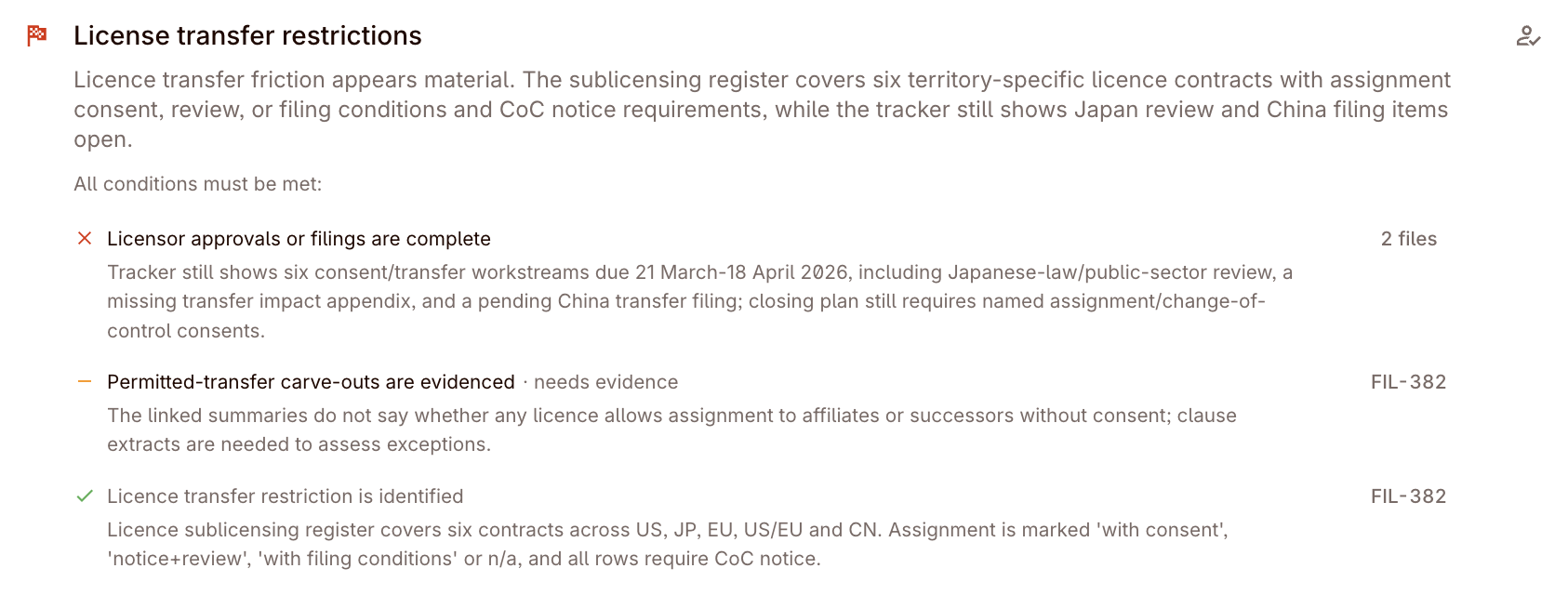
Some task-level flags also include conditions. These are not workflow steps or analyst to-dos. They are the concrete sub-tests inside a multi-file red-flag analysis.
For example, a task-level flag about permitted assignment may break into conditions like:
- written notice to the counterparty
- assignee net-worth threshold
- same-or-similar business requirement
- written consent where the exception does not apply
Colabra stores those as structured condition rows on the task flag, with per-file evidence and a worst status across the linked files. In the UI, conditions are grouped into what is already triggered, what still needs information or evaluation, and what appears satisfied.
This is what makes task flags different from ordinary single-file flags. A file-level flag usually says “this clause or number is risky.” A task-level flag with conditions says “this broader diligence test depends on several prongs across several files, and here is which prong is broken, unresolved, or already met.”
Clause-linked evidence
Every finding traces back to the specific clause, paragraph, or data point in the source document that produced it. This is what “clause-linked risk register” means in practice.
You never get a finding without being able to verify it. Click through from any finding to the file preview showing the exact source.
Triaging: confirm, dismiss, escalate
The findings tab is designed for triage, not just reading. For each finding:
- Confirm — the issue is real and should be tracked through to resolution or reporting.
- Dismiss — the flag is a false positive or represents acceptable risk in the context of this deal.
- Escalate — the issue needs senior review, additional evidence, or a follow-up request before a decision can be made.
The recommended operating pattern:
- Review the findings tab for concentration of risk — where are the dealbreakers and critical issues?
- Open the underlying files or entities rather than debating the summary alone.
- Convert unresolved issues into requests.
- Keep the triage decision visible in the product so the audit trail is clear.