
Automation rules
What automation covers
Colabra has a dedicated automation settings page at the workspace level which covers two related surfaces:
- Assignment automation for tasks and files
- Status automation for task workflow updates triggered by review events
Automation is useful when your team wants consistent routing and workflow updates without manual triage on every deal.
The best use of automation is not to make the workflow clever. It is to remove the repetitive routing and status updates that happen on every deal anyway.
Start with the routing pain you already repeat
Real deal example: automate the boring part first
If every German-language contract gets sent to the same specialist group and every financial deal-breaker gets escalated to finance, that is a good automation target. If the right owner depends on subtle judgement every time, keep it manual.
Assignment automation
Assignment automation is split by target type:
- Tasks
- Files
Each rule has:
- a rule name
- one or more conditions
- one or more actions
- an enabled or disabled state
- a position in the rule order
Rules can be reordered, which matters when your team uses multiple overlapping routing rules.
That order matters most when you mix broad baseline rules with narrow escalation rules. Put the narrow rules where they can win when the condition really matters.
Task assignment rules
Task rules currently support these condition types:
| Condition | Meaning |
|---|---|
| Project | Only fire for tasks in a specific project |
| Category | Match a task category |
| Subcategory | Match a task subcategory |
| Red flags | Match the highest red-flag severity on the task |
| Gaps | Match the gap verdict on the task |
Task rules currently support these actions:
| Action | Meaning |
|---|---|
| Assign → Specific user | Send the task to one named person |
| Assign → Group round robin | Rotate matching tasks across members of a selected group |
| Set status | Move the task into a selected workflow status |
| Set due date | Set a due date offset in days from when the rule fires |
| Set priority | Set the task priority automatically |
The finance escalation rule
Real deal example: task routing by risk
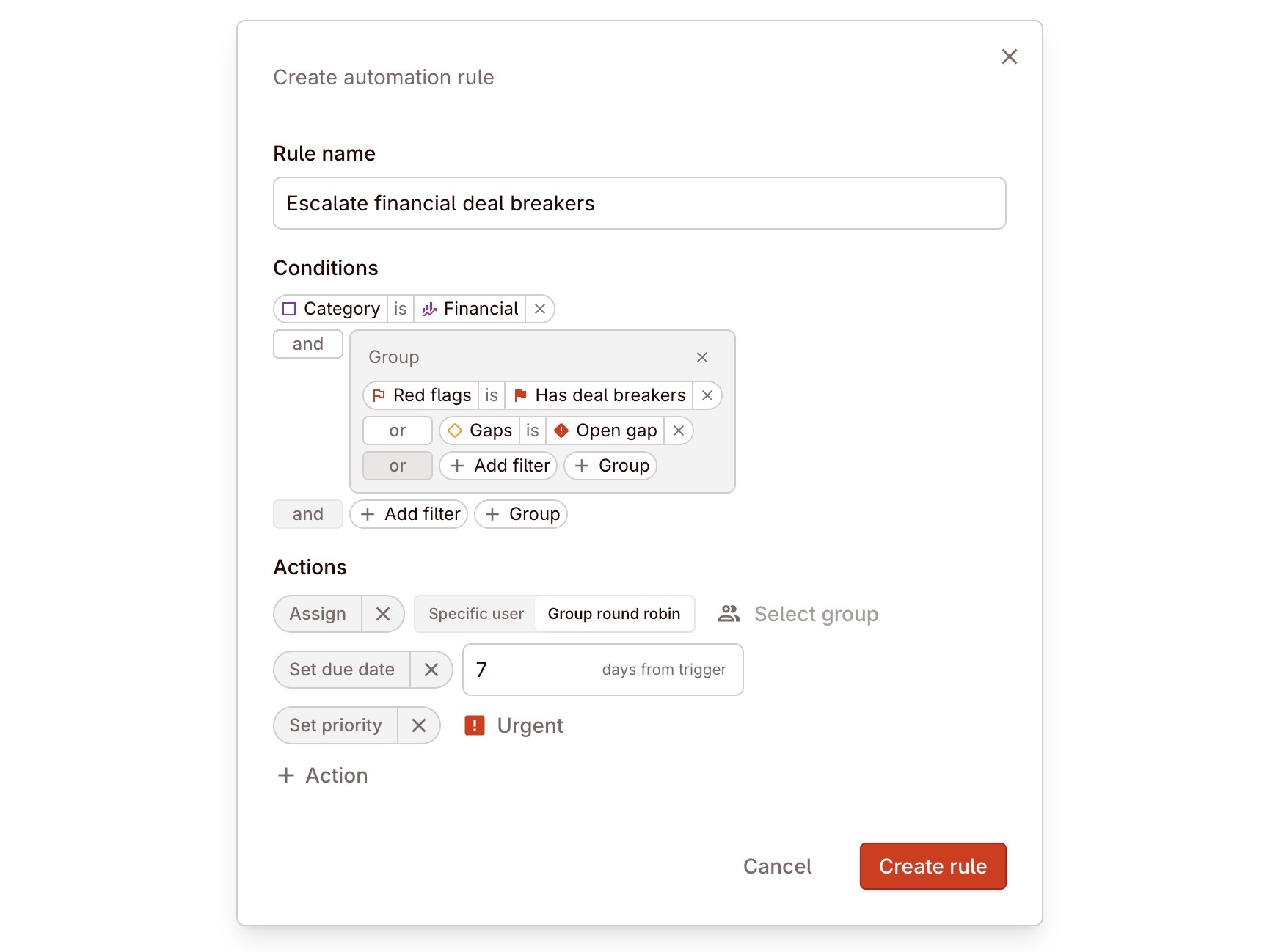
Create a task rule where Category is Financial and Red flags is Has deal breakers. Assign matching tasks to the finance group by round robin, set priority to urgent, and add a seven-day due date.
File assignment rules
File rules currently support these condition types:
| Condition | Meaning |
|---|---|
| Category | Match a file category |
| Subcategory | Match a file subcategory |
| Red flags | Match the highest red-flag severity on the file |
| Governing law | Match files by governing-law extraction |
| Jurisdiction | Match files by jurisdiction |
| Language | Match files by detected primary language |
| Type | Match files by file type |
File rules currently support these actions:
| Action | Meaning |
|---|---|
| Assign → Specific user | Send the file to one named reviewer |
| Assign → Group round robin | Rotate matching files across members of a selected group |
The multilingual contract queue
Real deal example: file routing after upload
Create a file rule where Category is Contracts and Language is German. Route those files to the DACH legal group by round robin so specialist reviewers get the right contracts immediately.
If your routing logic depends on language, governing law, or jurisdiction, the upstream setup matters too. Cross-border deals explains how extraction, diligence settings, and automation fit together.
Condition logic
The rule builder supports grouped conditions with and / or logic. That means you can build simple rules or more targeted structures such as:
Category is FinancialandRed flags is Has deal breakersRed flags is Has deal breakersorGaps is Open gap- one grouped branch for severity plus another grouped branch for category or jurisdiction
Use broad rules for baseline staffing and narrower grouped logic for escalation rules.
Status automation
Task status automation is separate from assignment routing.
The product supports two sets of task-status triggers.
Review automations
| Trigger | Result |
|---|---|
| On review request | Move the task to a selected status |
| On signature | Move the task to a selected status |
| Make task immutable if… | Lock tasks once they enter selected workflow stages |
Status automation is most useful when the team already agrees on what a given event should mean. If reviewers still debate what “ready for review” means, fix the workflow model first and automate second.
When to use automation vs. manual assignment
Use automation when:
- the same routing logic repeats across deals
- specialist groups need consistent work allocation
- severity or gap state should trigger immediate escalation
- the team wants workflow status to follow review activity automatically
Use manual assignment when:
- staffing is bespoke for one deal
- a temporary exception is needed
- the review owner depends on judgement that the rule builder cannot express cleanly
Automation works best as the default operating layer, with manual assignment left for exceptions rather than routine work.