
Dependencies and milestones
Deal management
Colabra is not just a place to store findings. It also has a coordination layer for the review work itself.
That layer matters when the next step on one task depends on another task finishing first, or when a group of tasks needs to roll up into a project checkpoint.
Task dependencies
Tasks can be linked to other tasks in three ways:
| Dependency | What it means |
|---|---|
| Blocked by | This task cannot move until another task is resolved first. |
| Blocking | This task is holding up another task. |
| Related | The tasks are connected, but one does not formally block the other. |
In the task sidebar, these relationships show up as dependency chips. Each dependency links back to the other task and shows its workflow status, so a reviewer can see whether the blocker is still active or already moving.
The point is not to build a heavyweight project-management graph. It is to make sequencing visible inside live diligence work. If a tax review depends on entity cleanup, or a consent analysis depends on the underlying contract set being completed first, that relationship should live with the task rather than in someone’s notes.
Adding dependencies
The app exposes dedicated dependency actions through the context menu:
- Mark as blocked by…
- Mark as blocking…
- Reference a task
Those flows let the reviewer search other tasks in the workspace and attach the dependency directly to the selected task.
When one workstream is waiting on another
Real deal example: sequencing the review
A financing-consent task may be blocked by a contract-inventory task because the team cannot finish the consent analysis until the full debt and customer agreement set is linked and reviewed. A dependency makes that sequencing visible instead of relying on side-channel coordination.
Project milestones
Milestones are deal-level checkpoints. They live on the project overview and can then be assigned down to individual tasks.
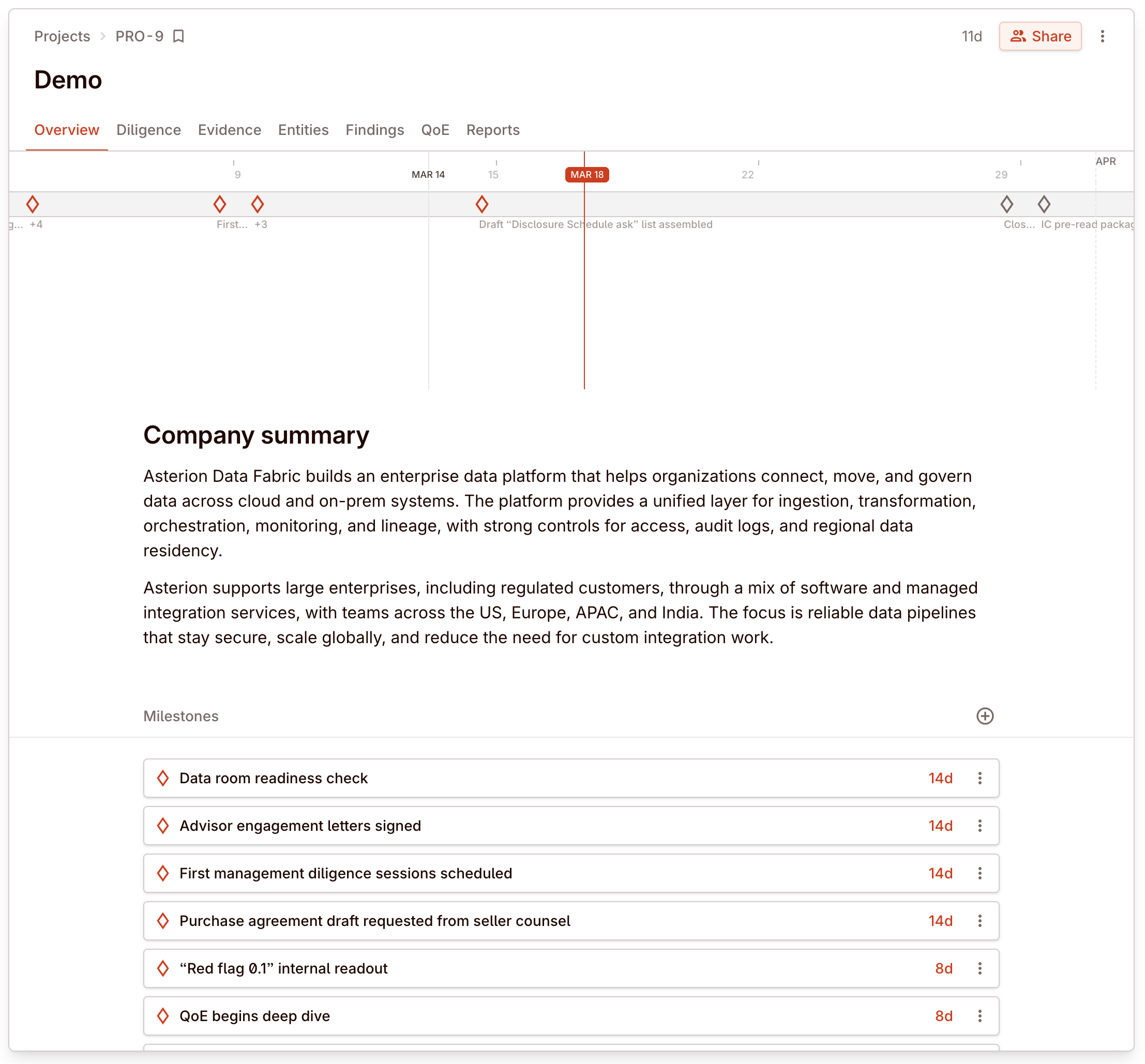
Milestones support:
- creation at the project level
- ordering and reordering
- due dates
- progress tracking from how many linked tasks are completed versus total
Milestones can be current, upcoming, overdue, and completed, so the team can see whether work is on track against the project plan.
Assigning tasks to milestones
Once a project has milestones, a task can be assigned to one of them from the task sidebar.
That is useful when you want more structure than just due dates. A due date tells you when one task should finish. A milestone tells you which project checkpoint that task belongs to.
Typical examples:
- management-presentation readiness
- quality-of-earnings first pass
- legal diligence sign-off
- confirmatory diligence close package
What this adds beyond status and priority
Status, priority, start date, and due date describe one task in isolation.
Dependencies and milestones add the coordination context:
- Dependencies explain sequencing between tasks
- Milestones explain how tasks roll up into project checkpoints
Recommended pattern
Use dependencies when:
- one task genuinely cannot finish before another
- a reviewer needs to make blockers visible to the wider team
- related workstreams would otherwise drift out of sequence
Use milestones when:
- the project has clear internal checkpoints
- multiple tasks need to roll up into one deliverable or review gate
- the team wants a visible progress marker beyond ad hoc due dates
If you only need one-off scheduling, stay with assignee, status, priority, start date, and due date. Add dependencies and milestones when coordination, not just ownership, is the problem.